


AI post writing
Platform-aware copy with an opening hook and a call to action where it fits, written for your industry and tone.
BlinkPost writes your post, adds hashtags, and creates a matching image. Then it schedules the post to Facebook, Instagram, or LinkedIn and shows you how it performed. One tool instead of four.
Free plan includes 2 AI posts a month. No credit card required.

Thank you for 5 years on the corner! All week, every loyalty card gets double stamps. Tell us your favorite order in the comments.

Saturday sourdough is out of the oven. Crackly crust, open crumb, and still warm until about 10am. Come early, the seeded loaf never lasts.

Three things we check before every small-business tax season: clean reconciliations, categorized expenses, and a cash-flow forecast for Q1.
Try before you sign up
Hover or tap a post to open it. Each one pairs a caption with a matching visual, sized for Instagram, Facebook, or LinkedIn.
Example posts written for fictional local businesses. Photos from Unsplash.
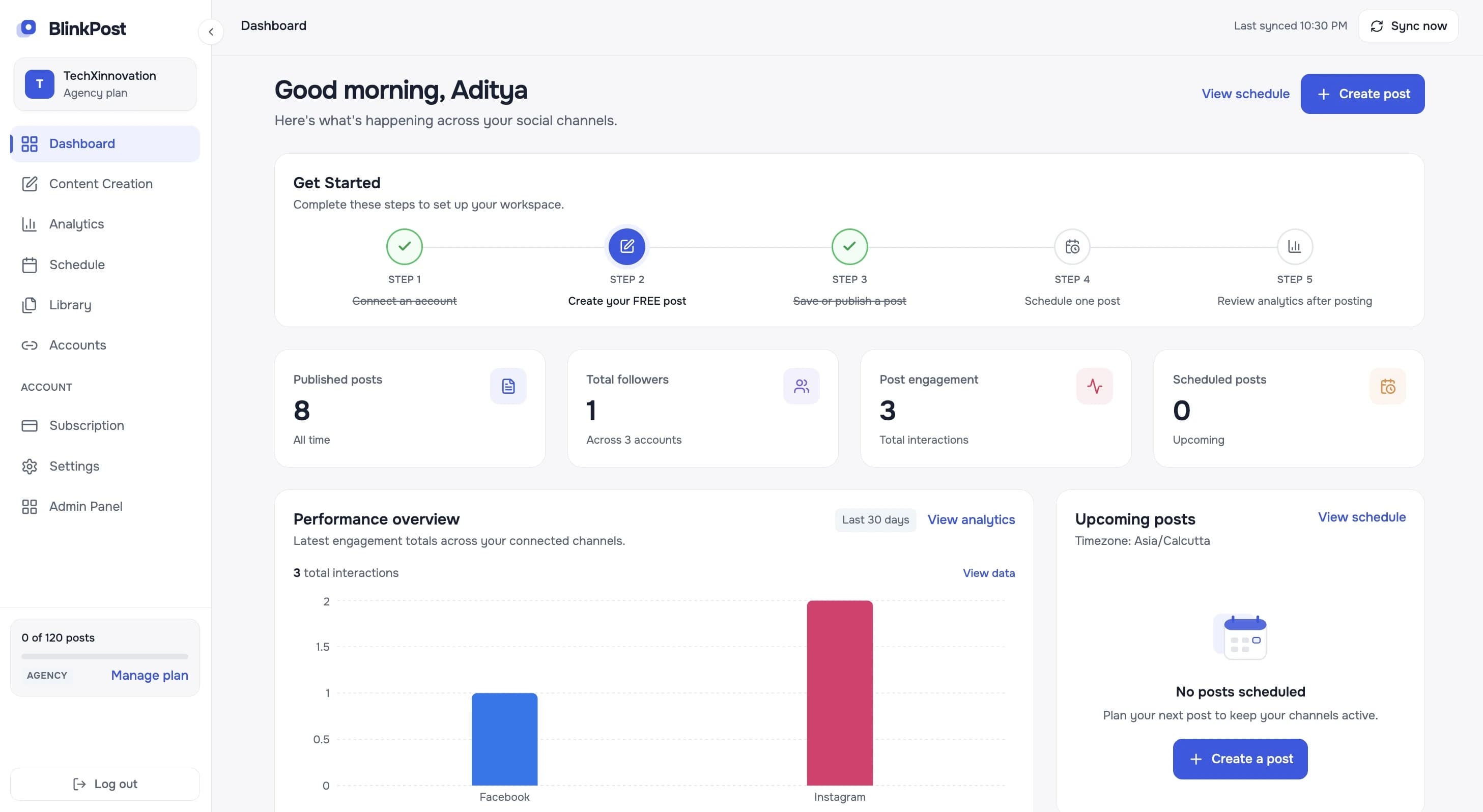
BlinkPost dashboard: content creation, calendar scheduling, and analytics across all your social channels.
Clear & Direct
AI social media management means using one tool to create, schedule, and measure your social posts, with AI doing the first draft of the writing and visuals. For a small business, that replaces the usual mix of a chat AI for captions, a design tool for images, a scheduler for posting, and each network's own insights page.
BlinkPost covers all four steps for Facebook, Instagram, and LinkedIn. You stay in charge: every post is a draft you can edit, and nothing is published until you schedule it.
What BlinkPost replaces
01
Write
Replaces: Chat AI for captions
Included in BlinkPost
02
Design
Replaces: Design tool for images
Included in BlinkPost
03
Schedule
Replaces: Separate scheduler
Included in BlinkPost
04
Measure
Replaces: Each network's insights
Included in BlinkPost
How it works
Four steps — from your business details to a live, measured post. The busywork disappears; the final say stays yours.
Make your first postAdd your website and BlinkPost fills in your profile, audience, brand voice, and services. No website? A few quick questions will do.
Pick a platform, topic, and tone. Get a tailored caption, useful hashtags, and a matching image sized for the network.
Review your draft, change the words, or add your own photos. Nothing goes out until you approve it.
Publish now or choose a date. See likes, comments, reach, and impressions together in one place.
Everything in one flow
Create, schedule, and measure in one place, without switching between tools.
Platform-aware copy with an opening hook and a call to action where it fits, written for your industry and tone.
An AI image created for each post in the right shape for the platform. Choose HD Image for detail or Fast Image for speed.
5–10 relevant hashtags and keywords arrive with every post, without hunting for them separately.
See drafts and scheduled posts together by date, so gaps in your posting plan are easy to spot and fill.
Likes, comments, shares, reach, and impressions in one dashboard, filtered by date range and synced hourly.
Save the competitors you watch and get an AI-assisted read on their content strategy, with actionable recommendations.
Use a photo of your work or product instead of the AI image, or add several images to one post to share as a carousel.
Platform Specific
Each post is tailored, formatted, and sized for the destination feed — never blindly cross-posted.
Write and schedule posts for your Facebook Page: offers, updates, community stories, and events.
Create captions, hashtags, and square or story-sized images, then publish to your Instagram Business account.
Draft professional posts for hiring, industry insight, and company news, and publish them to your LinkedIn profile.
Need posts for any network? Use the AI social media post generator →
Built by people who use it
BlinkPost handles social media for three businesses owned by our founder, one on each network we support.
JobsCrow
jobscrow.com
jobscrow.com
BlinkPost helps JobsCrow create professional LinkedIn content for employers, recruiters, and job seekers. It saves us time and helps us maintain a consistent presence with content tailored to our business audience.
Disclosure: JobsCrow, USA Roof Repair, and NRI Hearts are owned by BlinkPost's founder.
Tailored Experience
You run the business and the social accounts. BlinkPost gives you a finished draft to approve instead of a blank box.
Keep a steady posting rhythm without losing a day a week to captions, hashtags, and image hunting.
Plan the month on one calendar, keep drafts in one library, and report on what each post did.
Connect up to 50 social accounts on the Agency plan and produce up to 120 posts a month.
All-in-One Efficiency
What a typical small-business posting routine looks like with and without BlinkPost.
| Task | Separate tools | BlinkPost |
|---|---|---|
| Write the post | Chat AI tool | Included |
| Hashtags and keywords | Copy and paste from chat tool | Included with every post |
| Matching image | Design or image tool | Included, sized per platform |
| Schedule and publish | Scheduling tool | Included |
| Track results | Each network's own insights | One analytics dashboard |
Comparing options? Read BlinkPost vs ChatGPT and BlinkPost vs Buffer.
Simple pricing
Upgrade when you need more posts or connected accounts. Yearly billing saves 20%.
A simple place to start showing up.
$0forever
For a steady rhythm across your channels.
$19.99per month · $16/month billed yearly
For teams looking after many accounts.
$59per month · $47/month billed yearly
No credit card required to start.
Resources & Knowledge
Proven angles, content buckets, and practical examples that resonate with local customers.
A step-by-step guide to generating platform-ready copy that preserves your authentic voice.
Build a consistent monthly cadence across Instagram, Facebook, and LinkedIn without burnout.
A few good questions
Everything you need to know about getting started, capabilities, and plans.
Yes. BlinkPost runs an official Model Context Protocol (MCP) server at blinkpost.ai/mcp. Add it as a custom connector in Claude and ask Claude to write a post for your business, show your drafts, or schedule a post. Every post stays a draft until you schedule it. See the setup guide at blinkpost.ai/docs/mcp.
BlinkPost is an AI social media management tool for small businesses. It writes social media posts, suggests hashtags and keywords, creates a matching image, and schedules or publishes the post to Facebook, Instagram, and LinkedIn from one dashboard. It also tracks likes, comments, reach, and impressions after the post goes live.
The best tool is the one that covers the work you actually do each week. If your bottleneck is writing posts and finding images, pick a tool that creates content as well as schedules it. BlinkPost does both for Facebook, Instagram, and LinkedIn. If you only need a posting queue for many networks, a scheduling-only tool may be enough.
BlinkPost connects to Facebook Pages, Instagram Business accounts, and LinkedIn profiles. You can generate, schedule, and publish posts to all three. Instagram posts need at least one image, which BlinkPost can create for you.
Yes. The Free plan costs $0 and includes 2 AI-generated posts a month, up to 2 connected social accounts, and scheduling. Pro is $19.99 a month for 30 posts, and Agency is $59 a month for 120 posts. Yearly billing brings those down to $16 and $47 a month.
No. You sign up with your name, email, and a password. You only enter payment details if you choose to upgrade to Pro or Agency.
Both. Each post comes with an AI-generated image in the right shape for the platform: square for Instagram feed posts, vertical for stories, and wide for Facebook and LinkedIn. You can also use your own photos instead, including several images in one post.
During setup you can enter your website address. BlinkPost reads the page and fills in your business name, industry, target audience, brand voice, and main services. If you don't have a website, you answer a few short questions instead.
Yes. Every post is a draft until you schedule or publish it. You can rewrite the text, change hashtags, swap in your own image, or delete it.
Connect your social accounts, choose a date and time for a post, and BlinkPost publishes it to the selected account at that time. Scheduled posts are checked every two minutes, so they go out close to the time you set.
The Agency plan is built for higher volume: up to 120 AI-generated posts a month and up to 50 connected social accounts, with one calendar and one analytics view.
Your next post starts here
Create a free account, add your business, and generate your first post with its image.
Start freeNo credit card required.